> ## Documentation Index
> Fetch the complete documentation index at: https://docs.formae.io/llms.txt
> Use this file to discover all available pages before exploring further.
# Troubleshoot a build
> Read a failed plugin build on the hub, re-push a tag to fix it, and understand why a published tag is fixed.
When you push a tag, the hub builds your plugin and publishes the version. If a
build fails, the hub shows the reason on the plugin page, and you fix the cause
and try again. This guide explains how to read a failure and recover from it.
## Read the failure
A version whose build failed appears on the plugin page marked **build failed**,
with a short reason. Open the build to see the full message, the commit it built
from, and the attempt count.
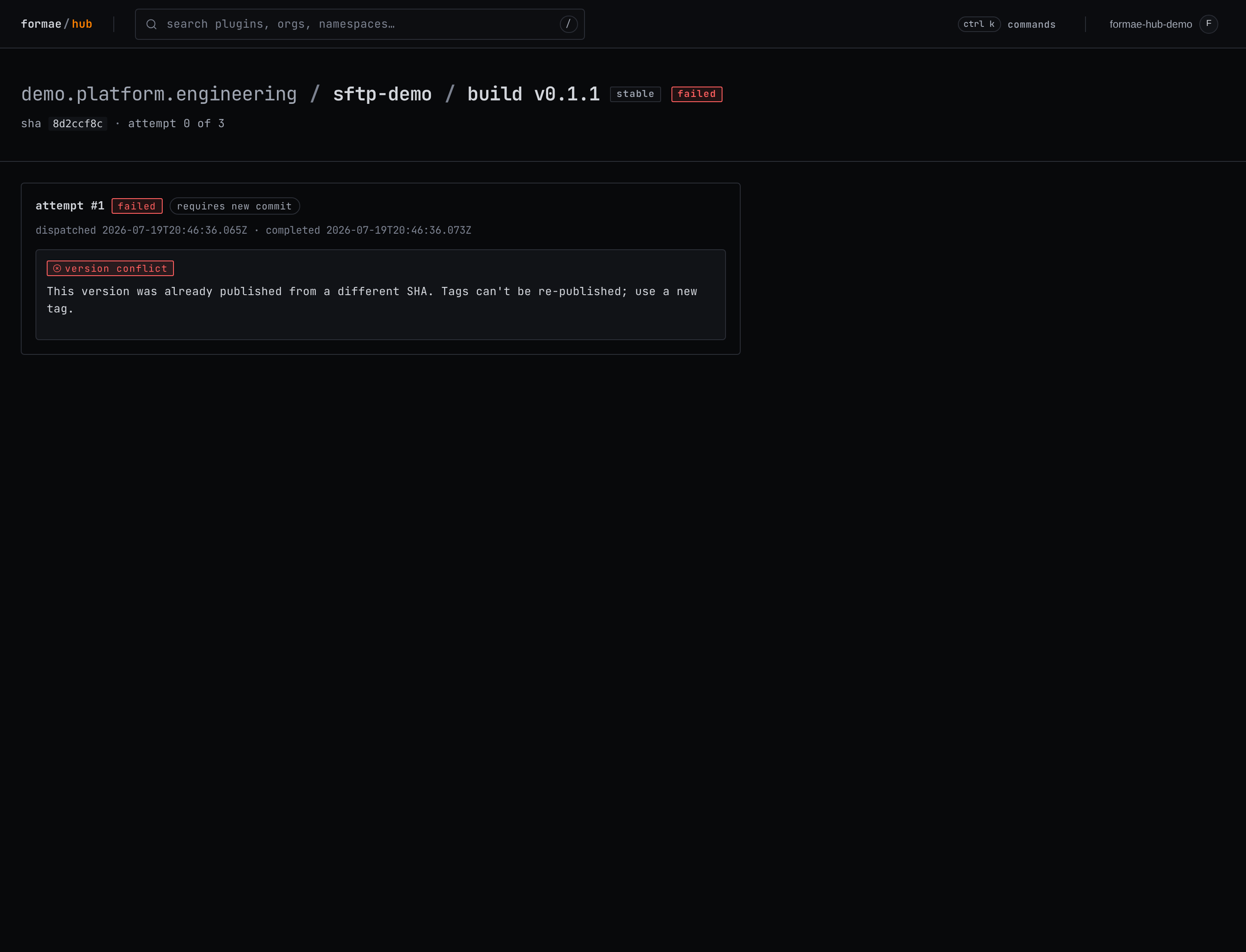 The hub classifies common failures so the message tells you what to do. The
example above is a version conflict, explained below.
## Fix and re-push, before a version succeeds
While a tag has not yet produced a successful build, the tag is not fixed. Fix
the cause in your code, then move the tag to the new commit and push it again:
```bash theme={"languages":{"custom":["/languages/pkl.json"]}}
git commit -am "fix the build"
git tag -f v0.1.0
git push -f origin v0.1.0
```
The hub rebuilds from the new commit. This is the normal way to iterate on a
release that has not landed yet.
## A published version's tag is fixed
Once a version has built successfully, its tag is locked to the commit it was
published from. If you move the tag afterward, the build fails with a clear
message:
> This version was already published from a different SHA. Tags can't be
> re-published; use a new tag.
This protects everyone who already installed the version from having it change
underneath them. To ship a fix, publish a **new** version with a new tag, as in
[Release a version](/plugin-development/guides/release-a-version).
## Retry or cancel a failed build
On the plugin page, a failed build offers two admin actions. **Retry** rebuilds
the version once the repository has a new commit to build from. **Cancel** clears
the failed entry. When a build has failed and cannot be retried automatically,
the plugin page shows an action-required note so the failure does not go
unnoticed.
## Common causes
* **License not accepted.** The `LICENSE` must be one the hub allows (`Apache-2.0`, `BSD-3-Clause`, `MIT`, or `MPL-2.0`), and its contents must match the standard text. See [Publish a plugin](/plugin-development/guides/publish-a-plugin).
* **Schema does not validate.** Every resource type must use the plugin's registered namespace. Run `make verify-schema` locally before tagging.
* **Version already published.** The tag points at a version that is already live from another commit, as above.
## See also
* [Release a version](/plugin-development/guides/release-a-version): the tag-driven release flow.
* [Test a plugin locally](/plugin-development/guides/test-a-plugin-locally): catch problems before you tag.
The hub classifies common failures so the message tells you what to do. The
example above is a version conflict, explained below.
## Fix and re-push, before a version succeeds
While a tag has not yet produced a successful build, the tag is not fixed. Fix
the cause in your code, then move the tag to the new commit and push it again:
```bash theme={"languages":{"custom":["/languages/pkl.json"]}}
git commit -am "fix the build"
git tag -f v0.1.0
git push -f origin v0.1.0
```
The hub rebuilds from the new commit. This is the normal way to iterate on a
release that has not landed yet.
## A published version's tag is fixed
Once a version has built successfully, its tag is locked to the commit it was
published from. If you move the tag afterward, the build fails with a clear
message:
> This version was already published from a different SHA. Tags can't be
> re-published; use a new tag.
This protects everyone who already installed the version from having it change
underneath them. To ship a fix, publish a **new** version with a new tag, as in
[Release a version](/plugin-development/guides/release-a-version).
## Retry or cancel a failed build
On the plugin page, a failed build offers two admin actions. **Retry** rebuilds
the version once the repository has a new commit to build from. **Cancel** clears
the failed entry. When a build has failed and cannot be retried automatically,
the plugin page shows an action-required note so the failure does not go
unnoticed.
## Common causes
* **License not accepted.** The `LICENSE` must be one the hub allows (`Apache-2.0`, `BSD-3-Clause`, `MIT`, or `MPL-2.0`), and its contents must match the standard text. See [Publish a plugin](/plugin-development/guides/publish-a-plugin).
* **Schema does not validate.** Every resource type must use the plugin's registered namespace. Run `make verify-schema` locally before tagging.
* **Version already published.** The tag points at a version that is already live from another commit, as above.
## See also
* [Release a version](/plugin-development/guides/release-a-version): the tag-driven release flow.
* [Test a plugin locally](/plugin-development/guides/test-a-plugin-locally): catch problems before you tag.